Network: Difference between revisions
Jump to navigation
Jump to search
 Current Situation
No edit summary |
No edit summary |
||
| Line 11: | Line 11: | ||
** Can be activated or deactivated with specific time states. | ** Can be activated or deactivated with specific time states. | ||
* [[Net Cluster]]s: Cluster of net loads that provides group (de)activation. | * [[Net Cluster]]s: Cluster of net loads that provides group (de)activation. | ||
** Can be associated with [[ | ** Can be associated with [[Net Load]]s of different [[Net Type]]s | ||
* [[Net Setting]]s: Settings related to the configuration of a Network of a specific Net Type. | * [[Net Setting]]s: Settings related to the configuration of a Network of a specific Net Type. | ||
Latest revision as of 15:14, 29 February 2024

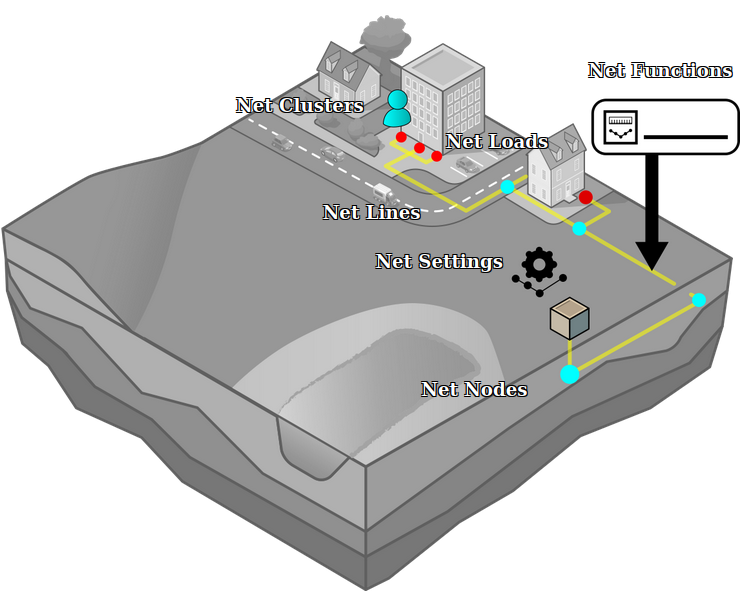
Network with Net Nodes connected by Net Lines, Net Loads clustered by Net Clusters and configured by Net Settings
Networks in the platform are composed of multiple constituent components:
- Net Type: A categorization of the network.
- Net Nodes: A node present in one or more networks
- Net Lines: A connection between two net nodes
- Has an associated Net Function, which in turn is related to a specific net type.
- Net Loads: A definition of supply or demand in the network
- Net Clusters: Cluster of net loads that provides group (de)activation.
- Net Settings: Settings related to the configuration of a Network of a specific Net Type.
Restrictions on networks
- Networks cannot contain any cycles. All networks should be defined as a tree. If the network is not structured as a tree, network generation and other calculations may have unexpected results.
- A net node can be connected to 1, 2, or more net lines, except when that node is a load node. In that case, a net node can only be connected to exactly 1 net line.
- Behavior for networks linked with buildings which are altered during a session are undefined. When using network functionality, the buildings linked to by the network should not be demolished, upgraded, sold to other stakeholders, or otherwise changed.
How-to's
- How to generate a network using the network wizard
- How to import an existing network
- How to manually edit a network
- How to check for errors when using the network wizard
- How to check for errors when using the net validation panel
Videos

See also
 Current Situation
- Buildings • Terrains • Administrative • Areas • Networks • Overlays • Indicators • Panels • Globals • Queries • Geo Import
- Buildings
- Function • Function Override • Traffic Units
- Terrain
- Height sector • Elevation model • Elevation GeoTIFF • Elevation Grid Overlay • Ground Price • Terrain Type • Terrain Type Override
- Administrative
- Net Cluster • Net Function • Net Line • Net Load • Net Node • Net Setting
- Editor