How to remove a traffic unit: Difference between revisions
Jump to navigation
Jump to search
No edit summary |
No edit summary |
||
| Line 1: | Line 1: | ||
It is not possible to remove a [[Unit Type]]. Instead, deactivate the Unit Type to hide it from the [[3D Visualization]]. | It is not possible to remove a [[Unit Type]]. Instead, deactivate the Unit Type to hide it from the [[3D Visualization]]. | ||
{{ | {{howto|title=Deactivate a Unit Type | ||
|title=Deactivate a Unit Type | |||
|Select [[Current Situation]]. | |Select [[Current Situation]]. | ||
|Hover [[Building]]s on the [[ribbon]] bar. | |Hover [[Building]]s on the [[ribbon]] bar. | ||
Latest revision as of 15:45, 17 November 2026
It is not possible to remove a Unit Type. Instead, deactivate the Unit Type to hide it from the 3D Visualization.
How to Deactivate a Unit Type:
- Select Current Situation.
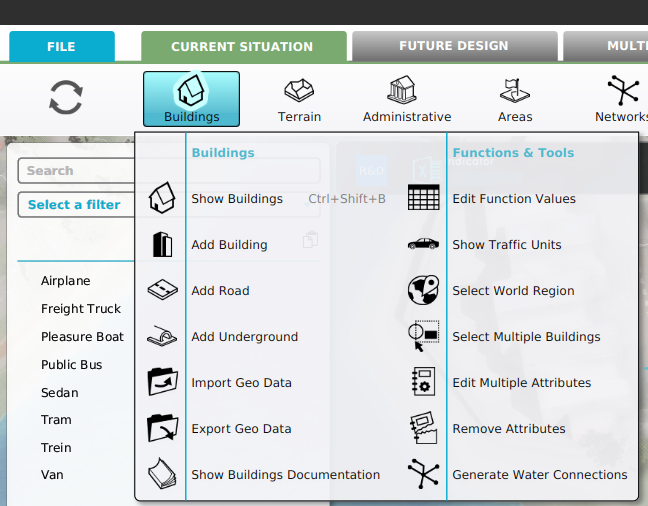
- Hover Buildings on the ribbon bar.
- Select Show Traffic Units in the popup.
- Select the Unit Type in the list in the left panel.
- Uncheck the Active in Simulation checkbox in the right panel.
-
-
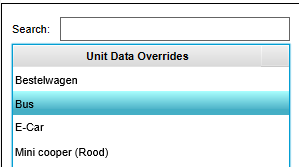 Select the Unit Type to be deactivated.
-
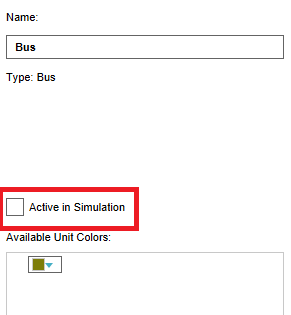 Uncheck the Active in Simulation checkbox.


