How to remove a traffic unit: Difference between revisions
Jump to navigation
Jump to search
No edit summary |
No edit summary |
||
| (One intermediate revision by the same user not shown) | |||
| Line 1: | Line 1: | ||
It is not possible to remove a [[Unit Type]]. | It is not possible to remove a [[Unit Type]]. Instead, deactivate the Unit Type to hide it from the [[3D Visualization]]. | ||
{{editor steps | {{editor steps | ||
| Line 19: | Line 19: | ||
|seealso= | |seealso= | ||
* [[Unit Type]] | * [[Unit Type]] | ||
|api=*[[Api session event editor unitdataoverride set active]] | |||
}} | }} | ||
[[Category:How-to's]][[Category:Unit Type]] | [[Category:How-to's]][[Category:Unit Type]] | ||
Latest revision as of 12:22, 7 July 2026
It is not possible to remove a Unit Type. Instead, deactivate the Unit Type to hide it from the 3D Visualization.
How to Deactivate a Unit Type:
- Select Current Situation.
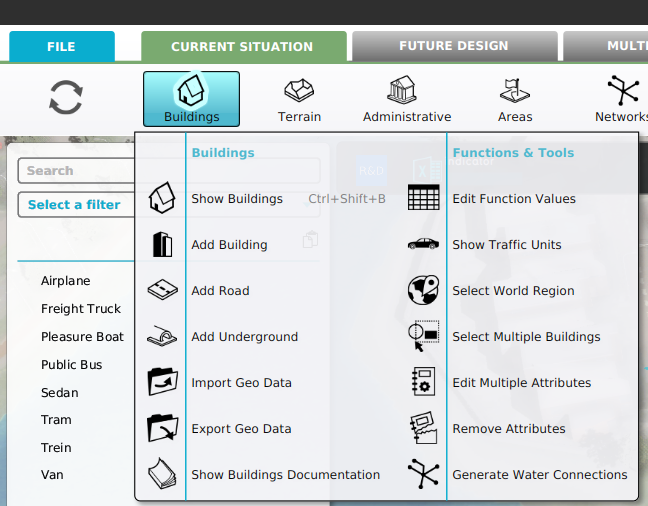
- Hover Buildings on the ribbon bar.
- Select Show Traffic Units in the popup.
- Select the Unit Type in the list in the left panel.
- Uncheck the Active in Simulation checkbox in the right panel.
-
-
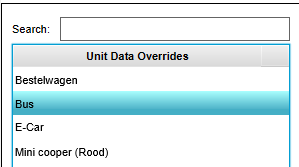 Select the Unit Type to be deactivated.
 -
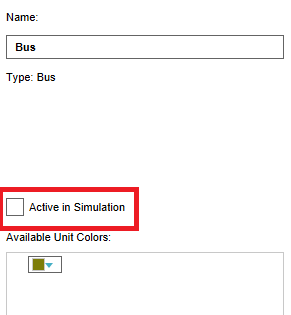 Uncheck the Active in Simulation checkbox.


