Buffer (TQL Param): Difference between revisions
Jump to navigation
Jump to search
No edit summary |
|||
| (8 intermediate revisions by the same user not shown) | |||
| Line 1: | Line 1: | ||
{{Param TQL | {{Param TQL| | ||
<onlyinclude> | <onlyinclude> | ||
{{Param TQL|tabletype=row| | {{Param TQL|tabletype=row|param=BUFFER|value=decimal|description=Buffer the limiting search [[Polygon]] with this value.|limits_search_polygon=true|}} | ||
</onlyinclude> | </onlyinclude> | ||
}} | }} | ||
====Available for==== | ====Available for==== | ||
<div style="column-count:3"> | |||
*[[Select floorsize (TQL)]] | *[[Select floorsize (TQL)]] | ||
*[[Select height (TQL)]] | *[[Select height (TQL)]] | ||
| Line 13: | Line 14: | ||
*[[Select lotsize (TQL)]] | *[[Select lotsize (TQL)]] | ||
*[[Select name (TQL)]] | *[[Select name (TQL)]] | ||
*[[Select units (TQL)]] | |||
*[[Update building attribute (TQL)]] | |||
</div> | |||
{{article end | {{article end | ||
| Line 27: | Line 30: | ||
|howtos= | |howtos= | ||
* [[How to use buffers (TQL)]] | * [[How to use buffers (TQL)]] | ||
|api=*[[Api session query]] | |||
}} | }} | ||
{{TQL param nav}} | {{TQL param nav}} | ||
Latest revision as of 13:45, 8 July 2026
| Param | Value | Description | Limits search polygon |
|---|---|---|---|
| BUFFER | decimal | Buffer the limiting search Polygon with this value. | true |
Available for
Notes
-
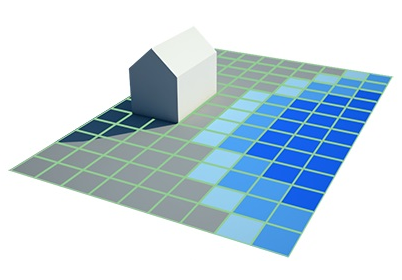 A Building and visualized Grid Overlay cells with different values.
 -
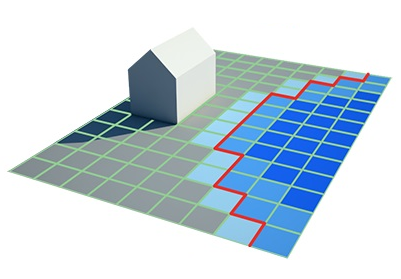 A TQL Query with Grid (TQL Param) and Mingridvalue (TQL Param) create a limiting search polygon.
 -
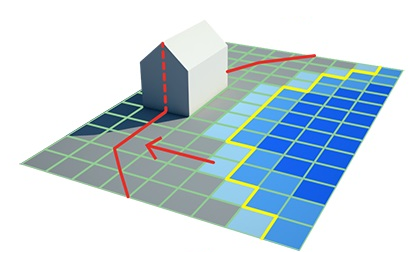 By adding a Buffer (TQL Param), the limit search polygon is expanded.
 -
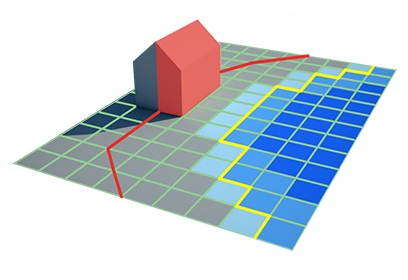 Now a Select lotsize (TQL) query provides the lot size of buildings within distance of specific grid cell values.


- This clause parameter allows you to include buildings within the buffer distance of the limiting search polygons
How-to's
API Endpoints