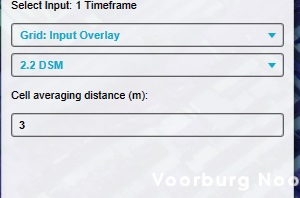
To identify structure walls for certain calculations, specific localized checks on elevation models are required. By analyzing the behavior and local changes in these models, a spatial calculation can be created to locate these walls.
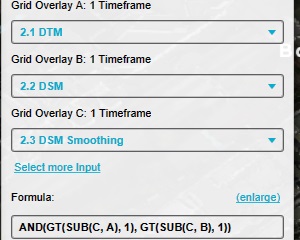
Add a Combo Overlay to the Project with the following configuration: Name: Walls Input A: DTM Overlay Input B:DSM Overlay Input C:"DSM Smoothing" Overlay Formula: AND(GT(SUB(C, A), 1), GT(SUB(C, B), 1))
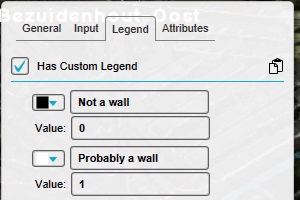
Modify the legend of the Combo Overlay to have only the following values: Value 0: No wall Value 1: Wall
Notes
This calculation performs an estimation of wall locations and may miss some areas. Therefore, it should not be taken as an absolute value, but can be used as a valid estimation in other calculations, such as the percentage of walls which also overlaps with specific sight-lines.
The formula of the Combo Overlay checks whether the localized average DSM exceeds the absolute height by at least 1 meter, which generally means that the height of a wall should be at least 2 meters high. By changing the "1" into a lower or higher number, the approximation can be made more or less sensitive respectively.