How to add and remove an Attribute: Difference between revisions
Jump to navigation
Jump to search
No edit summary |
No edit summary |
||
| Line 37: | Line 37: | ||
|seealso= | |seealso= | ||
* [[How to add an Attribute to a Function]] | * [[How to add an Attribute to a Function]] | ||
|api= | |||
*[[Api session event editor area set attribute]] | |||
*[[Api session event editor address set attribute]] | |||
*[[Api session event editor attributeaction set attribute]] | |||
*[[Api session event editor building set attribute]] | |||
*[[Api session event editor functionoverride set attribute]] | |||
*[[Api session event editor neighborhood set attribute]] | |||
*[[Api session event editor netline set attribute]] | |||
*[[Api session event editor netload set attribute]] | |||
*[[Api session event editor terraintype set attribute]] | |||
*[[Api session event editor weather set attribute]] | |||
*[[Api session event editor zone set attribute]] | |||
}} | }} | ||
[[Category:How-to's]] | [[Category:How-to's]] | ||
Revision as of 12:04, 14 July 2026
Attributes can be added to features such as Buildings, Stakeholders, Indicators, Areas and Overlays.
Attribute management is generally consistent, though some features require additional assets (e.g., indicators or terrains). Refer to the feature's main article for details.
Adding an Attribute
Editor → The type of data to edit (Ribbon bar) → The data to edit (Left panel) → Attributes tab (Right panel)
How to add an Attribute:
- Select in the editor the feature where you would like to add an Attribute to
- Select the Attribute tab on the right side
- Enter a name/ value pair for the new Attribute
- Select 'Save New Attribute'
- Notice the new attribute is added to the feature
-
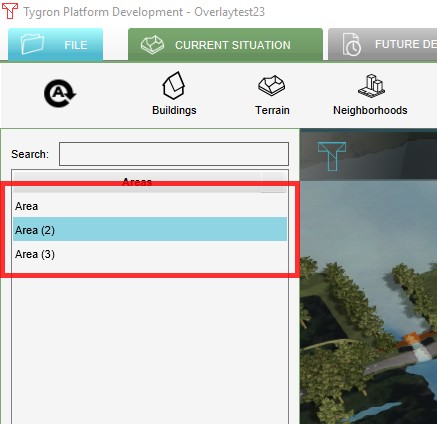 1. Select the feature where you would like to add an Attribute to
 -
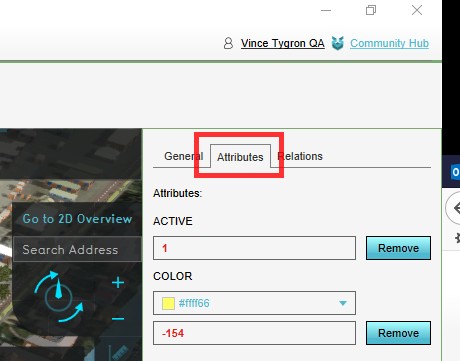 2. Select the Attribute tab
 -
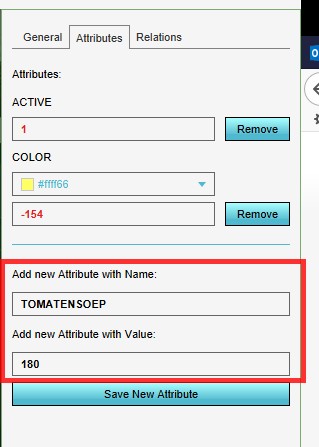 3. Enter a name/ value pair for the new Attribute
 -
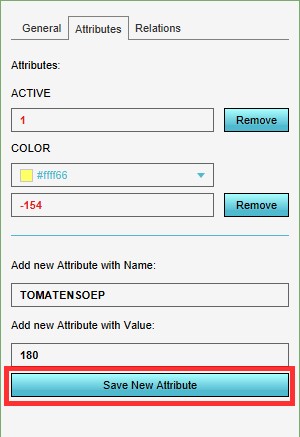 4. Select 'Save New Attribute'
 -
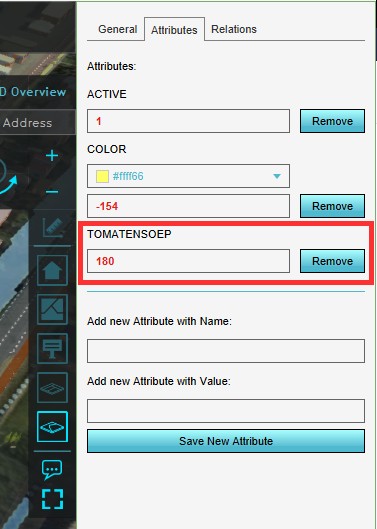 5. Notice the new attribute is added to the feature


Removing an Attribute
Editor → The type of data to edit (Ribbon bar) → The data to edit (Left panel) → Attributes tab (Right panel)
How to remove an Attribute:
- Select in the editor the feature where you would like to remove the Attribute from
- Select the Attribute tab on the right side
- Select 'remove' next to the Attribute you would like to remove
- Notice the Attribute is removed
-
1. Select the feature where you would like to remove the Attribute from
-
2. Select the Attribute tab on the right side
-
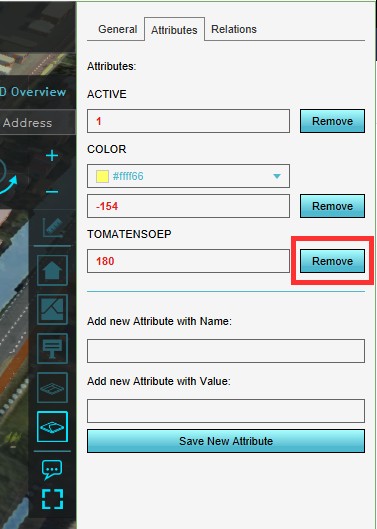 3. Select 'remove' next to the Attribute you would like to remove
 -
4. Notice the Attribute is removed


Removing all Attributes
To reset all attributes at once, select 'Reset Attributes' in the bottom corner on the right side.

See also
API Endpoints
- Api session event editor area set attribute
- Api session event editor address set attribute
- Api session event editor attributeaction set attribute
- Api session event editor building set attribute
- Api session event editor functionoverride set attribute
- Api session event editor neighborhood set attribute
- Api session event editor netline set attribute
- Api session event editor netload set attribute
- Api session event editor terraintype set attribute
- Api session event editor weather set attribute
- Api session event editor zone set attribute