How to remove a traffic unit: Difference between revisions
Jump to navigation
Jump to search
No edit summary |
No edit summary |
||
| Line 1: | Line 1: | ||
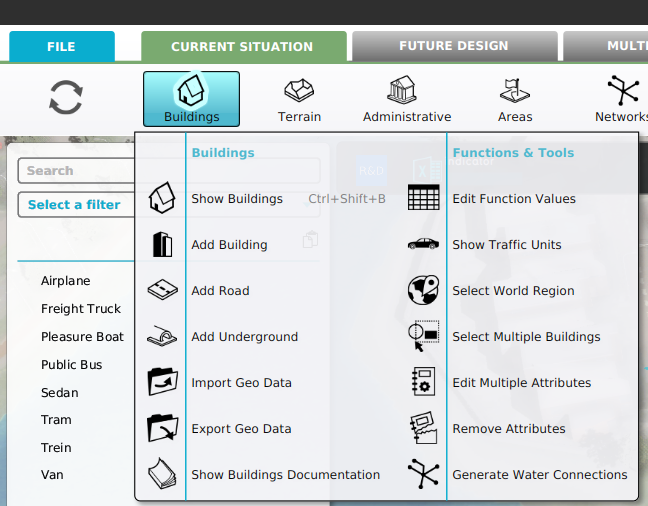
It is not possible to remove a [[Unit Type]]. However it is possible to make a Unit Type inactive and therefore not be visible in the [[3D Visualization]]. | It is not possible to remove a [[Unit Type]]. However it is possible to make a Unit Type inactive and therefore not be visible in the [[3D Visualization]]. | ||
{{ | {{editor steps | ||
|title=Deactivate a Unit Type | |||
|Select [[Current Situation]]. | |Select [[Current Situation]]. | ||
|Hover [[Building]]s on the [[ribbon]] bar. | |Hover [[Building]]s on the [[ribbon]] bar. | ||
|Select ''Show Traffic Units'' in the popup. | |Select ''Show Traffic Units'' in the popup. | ||
|Select the Unit Type in the list in the [[left panel]] | |Select the Unit Type in the list in the [[left panel]]. | ||
|Uncheck the Active in Simulation checkbox in the [[right panel]]}} | |Uncheck the Active in Simulation checkbox in the [[right panel]]. | ||
}} | |||
<gallery heights=200px widths=200px> | <gallery heights=200px widths=200px> | ||
File:Unit_type_ribbon.png|Select [[Current Situation]], hover [[Building]]s on the [[ribbon]] bar and select ''Show Traffic Units'' | File:Unit_type_ribbon.png|Select [[Current Situation]], hover [[Building]]s on the [[ribbon]] bar and select ''Show Traffic Units''/ | ||
File:Select_unit.png|Select the Unit Type to be deactivated | File:Select_unit.png|Select the Unit Type to be deactivated. | ||
File: | File:Unit_active_checkbox.png|Uncheck the Active in Simulation checkbox. | ||
</gallery> | </gallery> | ||
Revision as of 07:51, 6 July 2026
It is not possible to remove a Unit Type. However it is possible to make a Unit Type inactive and therefore not be visible in the 3D Visualization.
How to Deactivate a Unit Type:
- Select Current Situation.
- Hover Buildings on the ribbon bar.
- Select Show Traffic Units in the popup.
- Select the Unit Type in the list in the left panel.
- Uncheck the Active in Simulation checkbox in the right panel.
-
-
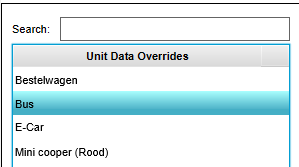 Select the Unit Type to be deactivated.
 -
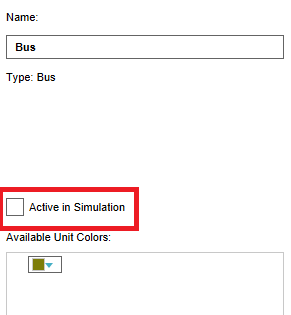 Uncheck the Active in Simulation checkbox.


