Buffer (TQL Param): Difference between revisions
Jump to navigation
Jump to search
No edit summary |
No edit summary |
||
| Line 1: | Line 1: | ||
{{Param TQL|suppresscategory=true|allowselflinks=true| | {{Param TQL|suppresscategory=true|allowselflinks=true| | ||
<onlyinclude> | <onlyinclude> | ||
{{Param TQL|tabletype=row|attribute=BUFFER|type=decimal|description=Buffer the limiting search | {{Param TQL|tabletype=row|attribute=BUFFER|type=decimal|description=Buffer the limiting search [[#Api Model Polygon|Polygon]] with this value.|polygon=true|}} | ||
</onlyinclude> | </onlyinclude> | ||
}} | }} | ||
Revision as of 11:52, 2 June 2026
| Param | Value | Description | Limits search polygon |
|---|---|---|---|
| Buffer the limiting search Polygon with this value. |
Available for
Notes
-
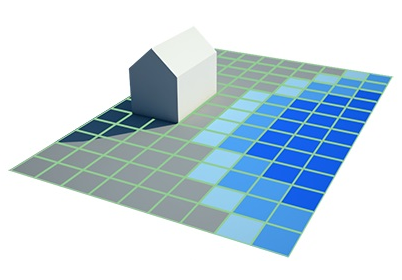 A Building and visualized Grid Overlay cells with different values.
 -
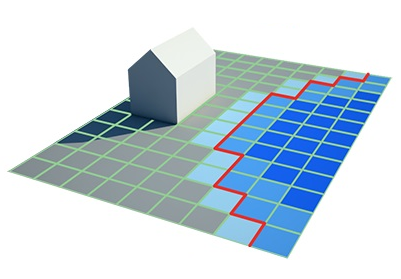 A TQL Query with Grid (TQL Param) and Mingridvalue (TQL Param) create a limiting search polygon.
 -
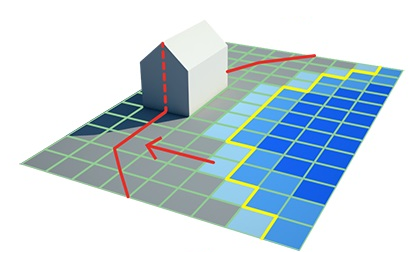 By adding a Buffer (TQL Param), the limit search polygon is expanded.
 -
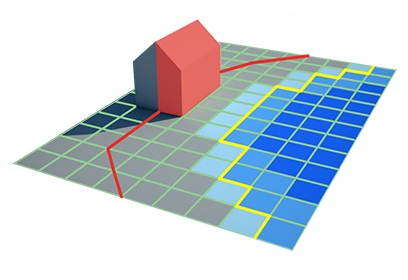 Now a Select lotsize (TQL) query provides the lot size of buildings within distance of specific grid cell values.


- This clause parameter allows you to include buildings within the buffer distance of the limiting search polygons
How-to's