For some calculations, it may be relevant to know where the walls of structures exist. This is a trivial consideration, but a bit more complex to implement in a geographical calculation. However, by using some localized checks on the behavior and local changes of elevation models, it is possible to create a spatial calculation which can find the locations of walls of structures.
To identify structure walls for certain calculations, specific localized checks on elevation models are required. By analyzing the behavior and local changes in these models, a spatial calculation can be created to locate these walls.
{{editor location|Overlays}}
{{editor location|Overlays}}
Line 7:
Line 7:
| Add a [[Heightmap Overlay]], configured as [[DSM]], to the [[Project]] (if it does not exist yet)
| Add a [[Heightmap Overlay]], configured as [[DSM]], to the [[Project]] (if it does not exist yet)
| {{howtoblock | image=dsm averaging.jpg
| {{howtoblock | image=dsm averaging.jpg
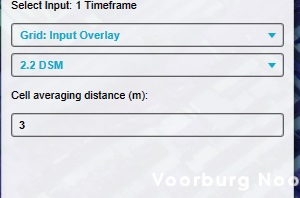
| Add an [[Average Overlay]] to the [[Project]] with the following configuration | Name: Average DSM | Set the averaging to the [[DSM]] [[Heightmap Overlay]]. | Set the averaging distance to approximately 2.5 times the [[grid cell size]]. }}
| Add an [[Average Overlay]] to the [[Project]] with the following configuration | Name: DSM Smoothing | Set the averaging to the [[DSM]] [[Heightmap Overlay]]. | Set the averaging distance to approximately 2.5 times the [[grid cell size]]. }}
| {{howtoblock | image=wall combo overlay.jpg
| {{howtoblock | image=wall combo overlay.jpg
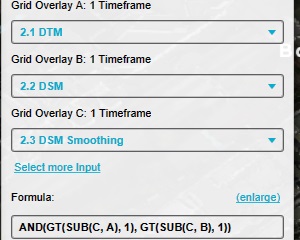
| Add a [[Combo Overlay]] to the [[Project]] with the following configuration: | Name: Walls | Input A: [[DTM]] Overlay | Input B:[[DSM]] Overlay | Input C:"Average DSM" Overlay | Formula: AND(GT(SUB(C, A), 1), GT(SUB(C, B), 1)) }}
| Add a [[Combo Overlay]] to the [[Project]] with the following configuration: | Name: Walls | Input A: [[DTM]] Overlay | Input B:[[DSM]] Overlay | Input C:"DSM Smoothing" Overlay | Formula: AND(GT(SUB(C, A), 1), GT(SUB(C, B), 1)) }}
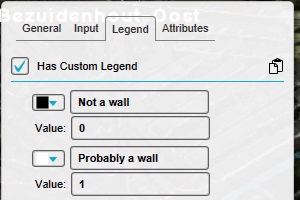
| Modify the legend of the [[Combo Overlay]] to have only the following values: | Value 0: No wall | Value 1: Wall }}
| Modify the legend of the [[Combo Overlay]] to have only the following values: | Value 0: No wall | Value 1: Wall }}
Line 16:
Line 16:
{{article end
{{article end
|notes=
|notes=
* This calculations performs an estimation of the locations of walls, and may miss spots. This calculation should therefor not be taken at absolute value, but can be used as a valid estimation in other calculations, such as the percentage of walls which also overlaps with specific [[Distance Sight Overlay|sightlines]].
* This calculation performs an estimation of wall locations and may miss some areas. Therefore, it should not be taken as an absolute value, but can be used as a valid estimation in other calculations, such as the percentage of walls which also overlaps with specific [[Sight Distance Overlay|sight-lines]].
* The formula of the [[Combo Overlay]] checks whether the localized average [[DSM]] exceeds the absolute height by at least 1 meter, which generally means that the height of a wall should be at least 2 meters high. By changing the "1" into a lower or higher number, the approximation can be made more or less sensitive respectively.
* The formula of the [[Combo Overlay]] checks whether the localized average [[DSM]] exceeds the absolute height by at least 1 meter, which generally means that the height of a wall should be at least 2 meters high. By changing the "1" into a lower or higher number, the approximation can be made more or less sensitive respectively.
|api=
* [[Api session event editor overlay add]]
* [[Api session event editor overlay set avg distance]]
* [[Api session event editor overlay set prequel]]
* [[Api session event editor overlay set combo formula]]
}}
}}
[[Category:How-to's]]
Latest revision as of 14:25, 15 July 2026
To identify structure walls for certain calculations, specific localized checks on elevation models are required. By analyzing the behavior and local changes in these models, a spatial calculation can be created to locate these walls.
Add a Combo Overlay to the Project with the following configuration: Name: Walls Input A: DTM Overlay Input B:DSM Overlay Input C:"DSM Smoothing" Overlay Formula: AND(GT(SUB(C, A), 1), GT(SUB(C, B), 1))
Modify the legend of the Combo Overlay to have only the following values: Value 0: No wall Value 1: Wall
Notes
This calculation performs an estimation of wall locations and may miss some areas. Therefore, it should not be taken as an absolute value, but can be used as a valid estimation in other calculations, such as the percentage of walls which also overlaps with specific sight-lines.
The formula of the Combo Overlay checks whether the localized average DSM exceeds the absolute height by at least 1 meter, which generally means that the height of a wall should be at least 2 meters high. By changing the "1" into a lower or higher number, the approximation can be made more or less sensitive respectively.