How to add a new Skill
From Tygron Support wiki
Revision as of 11:54, 6 October 2026 by
Frank@tygron.nl
(
talk
|
contribs
)
(
diff
)
← Older revision
|
Latest revision
(
diff
) |
Newer revision →
(
diff
)
Jump to navigation
Jump to search
How to add a new Skill:
Open a
project
in the
editor
Select the
Community
tab.
Hover over
Chats
in the
ribbon
Select
Show Skills
In the Skills overview panel, click on
Add
In the Skill detail panel, provide a unique name
Next, write a short description, one to two sentences max.
Next, write the skill content.
Opening the Skills overview using the Chats popup
Notes
Writing skill content for LLMs can be difficult, follow the following guidelines:
How to write a skill
External resources:
[
https://www.openskill.sh/docs/creators/best-practices
See also
Skill
Editor Community
Community
Public Share
•
Blog
•
Wiki
•
Tickets
•
Chats
•
Sign in ArcGIS
GenAI
Chat Channel
•
Chat Message
•
AI Agent
•
Skill
•
Agent Tool
•
AI Rules
•
Agent Attributes
Editor
Current Situation
•
Future Design
•
Multi Scenario
•
Tools
•
Community
Category
:
How-to's
Navigation menu
Personal tools
Namespaces
Page
Discussion
English
Views
Read
View source
View history
More
Search
Navigation
Main page
Recent changes
Random page
Upload files
Help
Tools
What links here
Related changes
Printable version
Permanent link
Page information
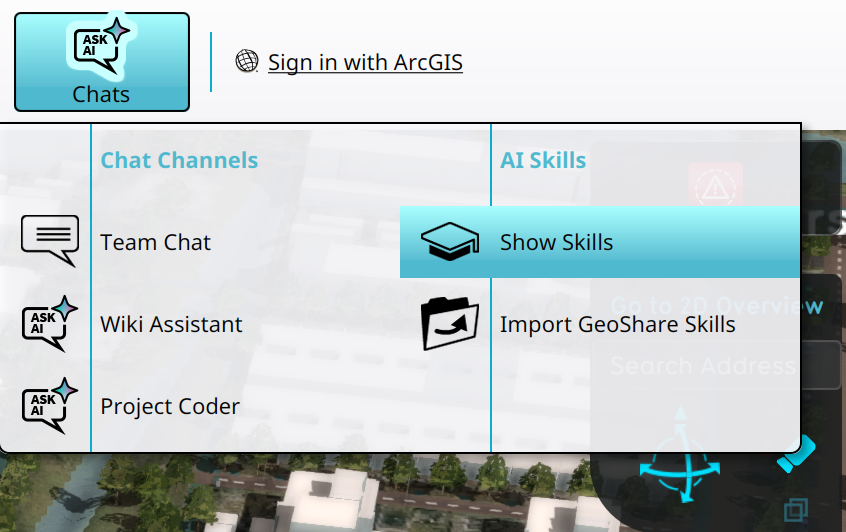 Opening the Skills overview using the Chats popup