Top bar

-
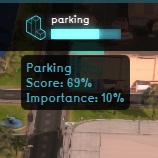 Hover over an indicator

The top bar is the interface element at the top of the Viewer interface. Displayed, in order from left to right, are the Domain logo, the stakeholder name, the time, the displayed Map Type, and the indicators. The logo will also start flashing red when the computer has trouble maintaining a connection with the Tygron Platform server. The stakeholder name indicates which role the user has selected, and thus which party they represent during the session. Display mode allows stakeholders to visually compare the Planned situation with its initial state in the 3D Visualization.
The right section of the top bar is entirely filled with the indicators that are accessible to your stakeholder. Each indicator shows the current amount of progress made on that indicator towards the target set for it. By hovering over the indicators, you can see the full name of the indicator and the current score on the indicator.