How to duplicate a traffic unit: Difference between revisions
Jump to navigation
Jump to search
No edit summary |
No edit summary |
||
| Line 18: | Line 18: | ||
|seealso= | |seealso= | ||
*[[Unit Type]] | *[[Unit Type]] | ||
|api= | |||
*[[Api session event editor unitdataoverride duplicate]] | |||
}} | }} | ||
[[Category:How-to's]][[Category:Unit Type]] | [[Category:How-to's]][[Category:Unit Type]] | ||
Latest revision as of 14:57, 17 June 2026
By selecting the 'Duplicate' button on the bottom of list of Unit Types, a new Unit Type appears on the list with the followup number in parentheses. The list is alphabetical per Unit Type. Whether the new Unit Type is immediately visible in the 3D Visualization depends on the parent Unit Type that is duplicated. It will copy the active or inactive state of the original Unit Type.
How to Duplicate Traffic Units:
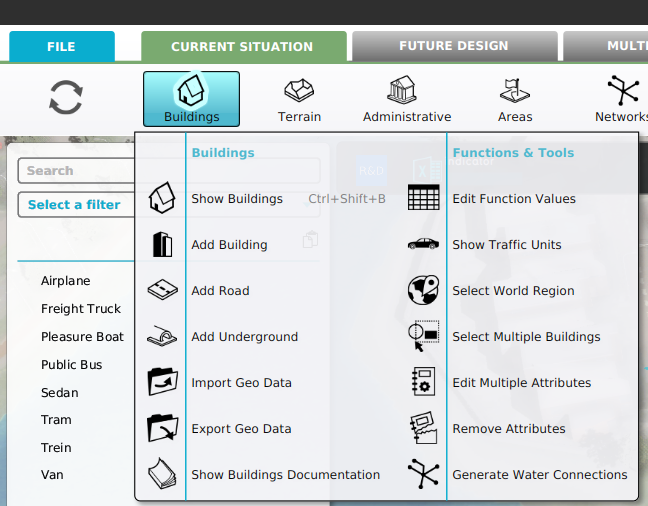
- Select Current Situation.
- Hover Buildings on the ribbon bar.
- Select Show Traffic Units in the popup.
- Select 'Duplicate' from the bottom of the list in the left panel
- Notice the new duplicated Unit Type has been added to the list in the left panel
-
-
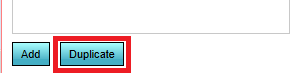 Select 'Duplicate' from the bottom of the list
 -
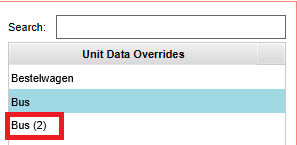 Notice the new duplicated unit


