How to create Functions: Difference between revisions
Jump to navigation
Jump to search
No edit summary |
No edit summary |
||
| (2 intermediate revisions by the same user not shown) | |||
| Line 17: | Line 17: | ||
* Duplication of [[Function]]s which already exist is currently the only way to create additional [[Function]]s. | * Duplication of [[Function]]s which already exist is currently the only way to create additional [[Function]]s. | ||
* A duplicated [[Function]] will have the same [[Function value]]s as the [[Function]] it was based on, unless it explicitly has that [[Function Value]] set. | * A duplicated [[Function]] will have the same [[Function value]]s as the [[Function]] it was based on, unless it explicitly has that [[Function Value]] set. | ||
* If a [[Function]] | * If you duplicate a [[Function]] without setting its own [[Function Value]]s, changes to the original [[Function]]'s values are reflected in the duplicate. | ||
<gallery widths=300px> | <gallery widths=300px> | ||
File:function_color_reflected_in_duplicate.jpg|Changing an asset color for the Sports | File:function_color_reflected_in_duplicate.jpg|Changing an asset color for the Sports Center [[Function]] also changes that color for the Sports Center duplicate Function. | ||
File:function_color_override_in_duplicate.jpg|However, the duplicate [[ | File:function_color_override_in_duplicate.jpg|However, the duplicate [[Function]] can override the asset color, and no longer changes with the color change of the original Sports Center Function. | ||
</gallery> | </gallery> | ||
|seealso= | |seealso= | ||
* [[Function]] | * [[Function]] | ||
* [[Function Override]] | |||
* [[Function Values Table]] | * [[Function Values Table]] | ||
* [[Function Value]] | * [[Function Value]] | ||
| Line 29: | Line 30: | ||
* [[How to add Functions for editing]] | * [[How to add Functions for editing]] | ||
* [[How to change Function Values for a Function]] | * [[How to change Function Values for a Function]] | ||
|api=*[[Api session event editor functionoverride duplicate]] | |api=*[[Api session items functions]] | ||
*[[Api session event editor functionoverride duplicate]] | |||
}} | }} | ||
[[Category:How-to's]] | [[Category:How-to's]] | ||
Latest revision as of 12:10, 13 October 2026
Using the Function Values Table, it is possible to create new Functions based on existing Functions by duplicating an existing Function. The properties of the new Function can then be changed independently of the old Function.
How to create a new Function through duplication:
- Ensure the Function you wish to duplicate is present in the Function Values Table
- Select the Function which you want to duplicate from the list.
- Select "Duplicate".
- Find the newly created Function at the bottom of the list.
-
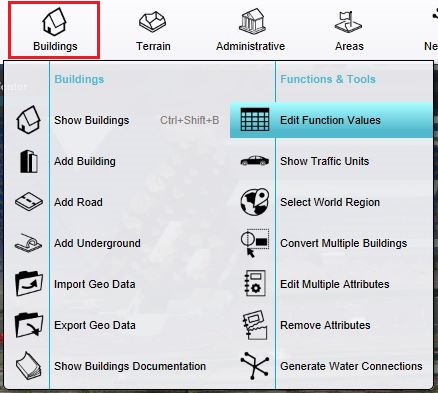 The Function Values Table can be opened here.
 -
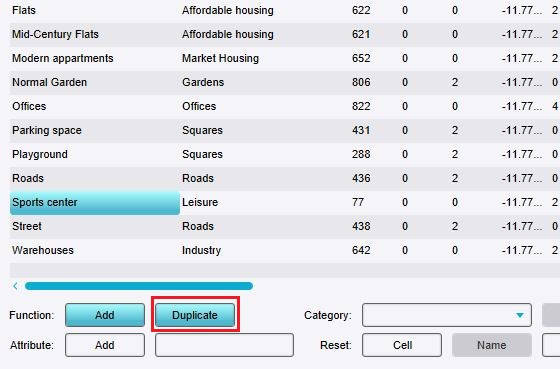 Select a Function in the table and click on the duplicate button.
 -
 The duplicated function indicated by blue and with a much higher ID number.


Notes
- Duplication of Functions which already exist is currently the only way to create additional Functions.
- A duplicated Function will have the same Function values as the Function it was based on, unless it explicitly has that Function Value set.
- If you duplicate a Function without setting its own Function Values, changes to the original Function's values are reflected in the duplicate.
-
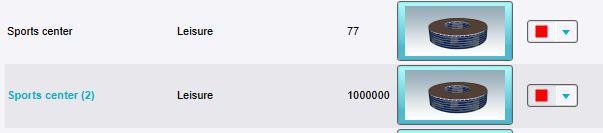 Changing an asset color for the Sports Center Function also changes that color for the Sports Center duplicate Function.
 -
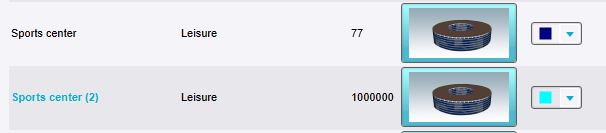 However, the duplicate Function can override the asset color, and no longer changes with the color change of the original Sports Center Function.

