How to create a GeoJSON file in ArcMap
A GeoJSON file can also be created in ArcGIS using the Data Interoperability Extension. In ArcMap, this extension is required to export datasets directly to GeoJSON. (Note: ArcGIS Pro supports GeoJSON natively). Keep in mind that the JSON output data format is not the same as the GeoJSON format. The steps below describe how to create a GeoJSON file in ArcGIS.
How to save a dataset in GeoJSON format in ArcGIS:
- Open the dataset in ArcMap
- In the menu bar, go to the Customize menu and choose Extensions
- Select the Data Interoperability Extension
- Choose the Quick Export tool from the Data Interoperability Toolbox
- In the Quick Export tool: choose the input layer, set the output format to GeoJSON and provide a location for saving the exported dataset
-
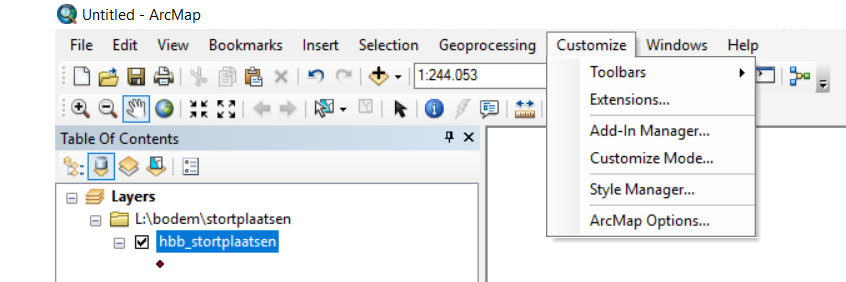 Navigate in the Menu bar to Customize and then click on Extensions
 -
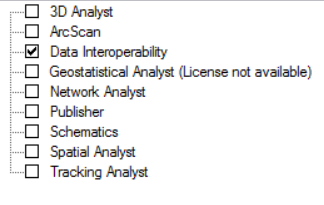 Select the Data Interoperability Extension
 -
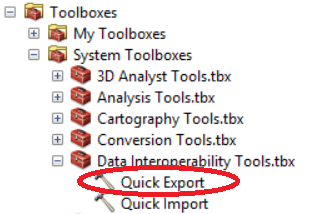 Choose the Quick Export tool in the Data Interoperability Toolbox
 -
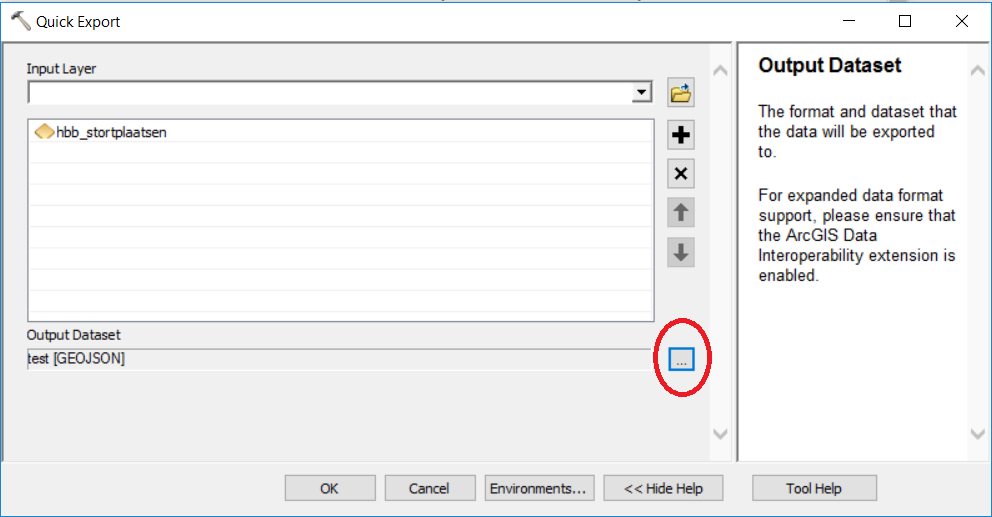 Select the input layer and click on the button (see image)
 -
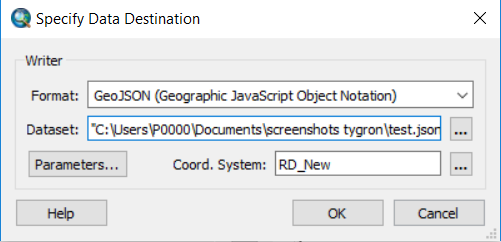 Choose the GeoJSON output format and the right location and dataset name for saving the new dataset


