How to duplicate an Area
From Tygron Support wiki
Revision as of 14:45, 29 May 2026 by
Frank@tygron.nl
(
talk
|
contribs
)
(
diff
)
← Older revision
| Latest revision (diff) | Newer revision → (diff)
Jump to navigation
Jump to search
Editor
→
Current Situation (
Ribbon tab
)
→
Areas (
Ribbon bar
)
How to duplicate an Area:
Select "Areas" in the ribbon bar.
Select the area you wish to duplicate.
Select "Duplicate" in the
left panel
.
Select "Areas"
Select Area to duplicate
Click on Duplicate
See also
Area
API Endpoints
Api session event editor area duplicate
Categories
:
How-to's
Area
Navigation menu
Personal tools
Namespaces
Page
Discussion
English
Views
Read
View source
View history
More
Search
Navigation
Main page
Recent changes
Random page
Upload files
Help
Tools
What links here
Related changes
Printable version
Permanent link
Page information
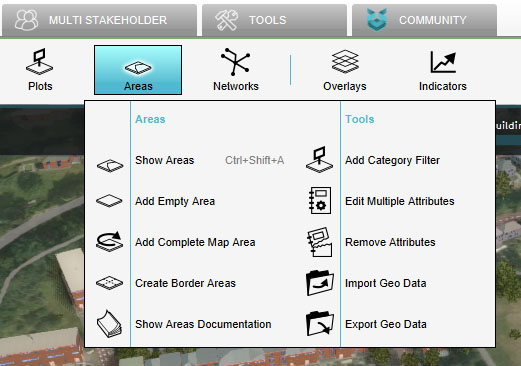 Select "Areas"
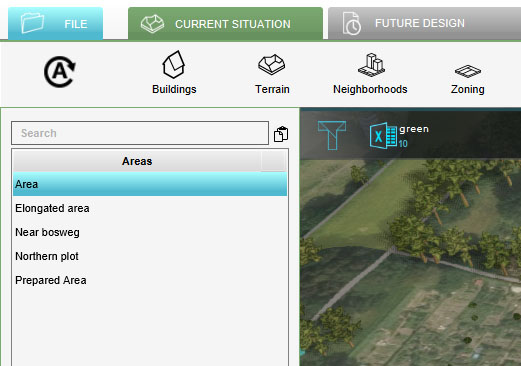 Select Area to duplicate
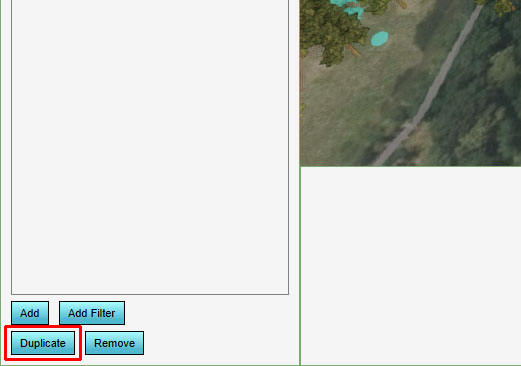 Click on Duplicate

