How to export AI Training Data
This how-to explains how to generate an AI Training Data using the Tygron Platform. This data can be used to train your own AI model.
-
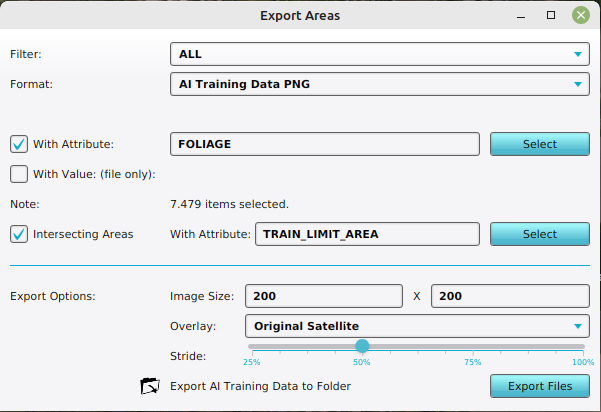 Configuration of the Export AI Training Data as PNG's for Foliage Areas on a Satellite Overlay, with an intersecting area.

Notes
- In case the export folder is not empty, a confirmation popup will appear on overriding the existing image, label, mask and bounding box files.
- In case a region intersects the limit area, but does not contain any features, it is still exported as a dataset-entry (image-, label-, mask- and bbox-file) but without labels, mask pixels or bounding box entries.
- In case the feature density is low, the image size can be increased.
- In case the feature sizes are small compared to the image size, the stride can be increased.
- A dataset can also be generated as AI Training Data CSV, which allows users to directly train on float matrices instead of color images.