How to force Grid Overlays to recalculate: Difference between revisions
No edit summary |
No edit summary |
||
| Line 7: | Line 7: | ||
</gallery> | </gallery> | ||
Certain overlay configurations may impact project performance. For more information see the [[ | Certain overlay configurations may impact project performance. For more information see the [[Troubleshooting calculation performance]] page. | ||
{{article end | {{article end | ||
Revision as of 08:22, 13 November 2026
During a test run, Grid Overlays are automatically recalculated whenever a change is made to the state of the project, including non-geographical data such as globals or attributes. While editing, a grid is also updated when project data is changed and Auto Update is on. However, some parameters can be changed in the editor which cannot be changed during a session, such as the properties or attributes of overlays. To prevent more complex overlays slowing down editing work, a grid overlay is not always automatically recalculated when these kinds of parameters are changed. To force the grids to recalculate, the "Update Now" option can be used on any grid overlay. This will force all grids to recalculate.
-
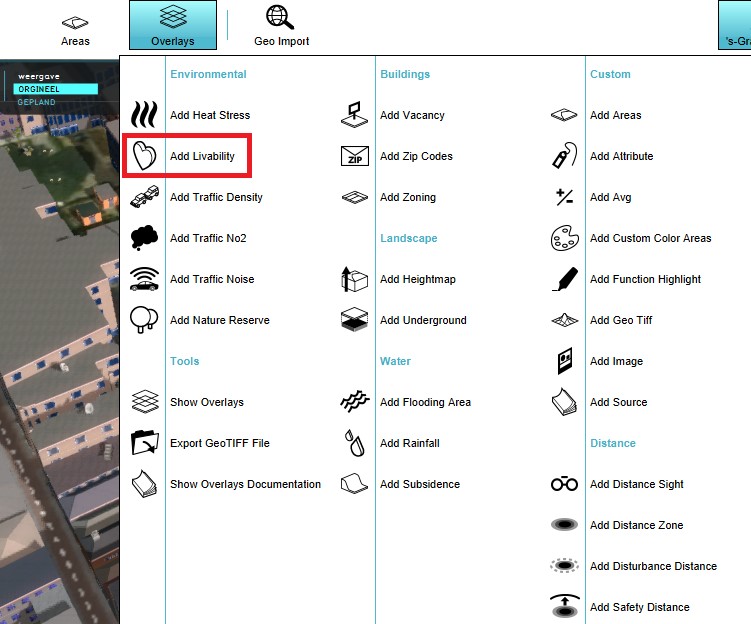 Select a grid overlay
-
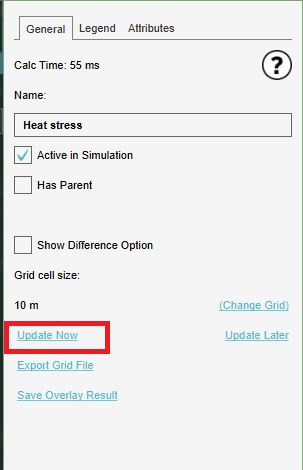 Select the Update Now option


Certain overlay configurations may impact project performance. For more information see the Troubleshooting calculation performance page.