How to change ownership for an area: Difference between revisions
Jump to navigation
Jump to search
No edit summary |
No edit summary |
||
| Line 1: | Line 1: | ||
{{Editor location|Stakeholders}} | {{Editor location|Stakeholders}} | ||
{{Editor steps|title=change area [[ownership]] per stakeholder|Select [[Multi Scenario]] > [[Stakeholder]]s > Show Stakeholders|Select on the left panel the stakeholder to which [[ownership]] of an area will be assigned|Select the "Draw Ownership" button from the bottom of the right panel with the properties of the selected stakeholder, the [[Overlay#Property|ownership overlay]] will become visible|Use the [[Brush|Brush Panel]] to draw the area in the 3D Visualization and Apply the selection}}<br> | {{Editor steps|title=change area [[ownership]] per stakeholder | ||
|Select [[Multi Scenario]] > [[Stakeholder]]s > Show Stakeholders | |||
|Select on the left panel the stakeholder to which [[ownership]] of an area will be assigned | |||
|Select the "Draw Ownership" button from the bottom of the right panel with the properties of the selected stakeholder, the [[Overlay#Property|ownership overlay]] will become visible | |||
|Use the [[Brush|Brush Panel]] to draw the area in the 3D Visualization and Apply the selection}}<br> | |||
<gallery> | <gallery> | ||
File:SelectEditStakeholders.jpg|1. Select to Edit Stakeholders | File:SelectEditStakeholders.jpg|1. Select to Edit Stakeholders | ||
| Line 12: | Line 16: | ||
* [[Stakeholder]] | * [[Stakeholder]] | ||
* [[Ownership]] | * [[Ownership]] | ||
* [[Plot]] | |||
|api=*[[Api session event editor plot add polygons]] | |||
}} | }} | ||
[[Category:Stakeholder]][[Category:How-to's]] | [[Category:Stakeholder]][[Category:How-to's]] | ||
Revision as of 14:05, 29 May 2026
How to change area ownership per stakeholder:
- Select Multi Scenario > Stakeholders > Show Stakeholders
- Select on the left panel the stakeholder to which ownership of an area will be assigned
- Select the "Draw Ownership" button from the bottom of the right panel with the properties of the selected stakeholder, the ownership overlay will become visible
- Use the Brush Panel to draw the area in the 3D Visualization and Apply the selection
-
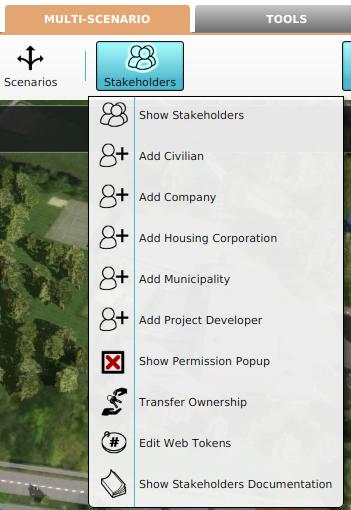 1. Select to Edit Stakeholders
 -
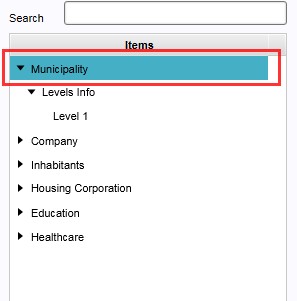 2. Select the stakeholder from the list on the left panel
 -
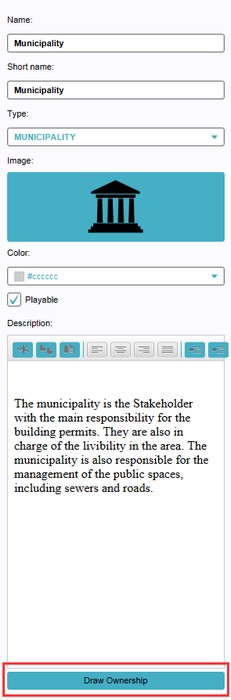 3. Select 'Draw Ownership' from the bottom of the right panel
 -
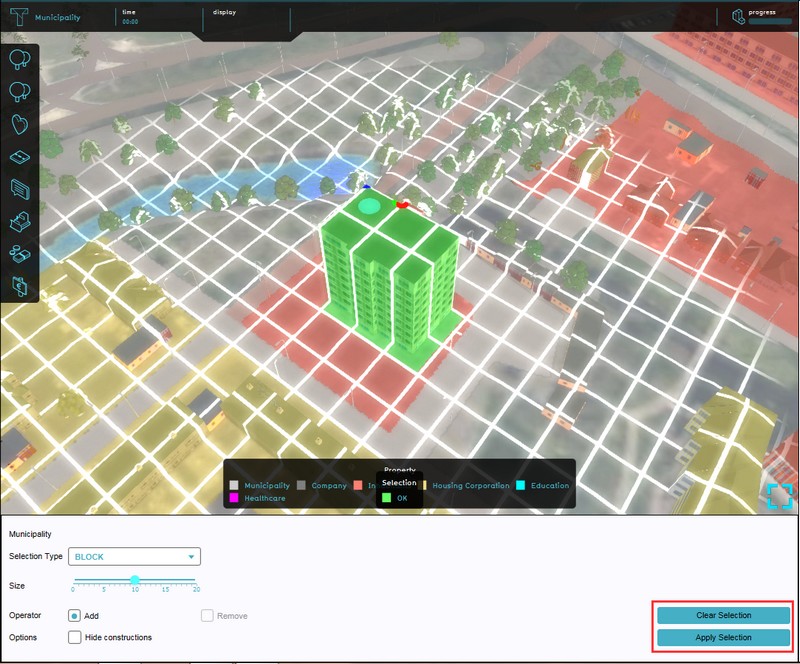 4. Use the brush to draw the area and confirm with 'Apply Selection'


