How to export Revit models to IFC: Difference between revisions
Jump to navigation
Jump to search
No edit summary |
No edit summary |
||
| Line 18: | Line 18: | ||
|seealso= | |seealso= | ||
* [[IFC]] | * [[IFC]] | ||
|howtos=*[[How to export Blender models to IFC]] | |||
*[[How to export Sketchup models to IFC]] | |||
|external= | |external= | ||
* https://www.autodesk.com/products/revit/overview - The official Autodesk Revit website | * https://www.autodesk.com/products/revit/overview - The official Autodesk Revit website | ||
}} | }} | ||
Latest revision as of 09:26, 10 July 2026
How to export Revit models to IFC:
- Open Revit and open the model that you wish to export.
- To export go to file -> Export -> IFC.
- In the export dialog choose specifiy the location where the file should be exported.
- In the Export setup dropdown list choose IFC4 Reference view as option.
- Click on export.
- Import the IFC file in the Tygron Platform.
-
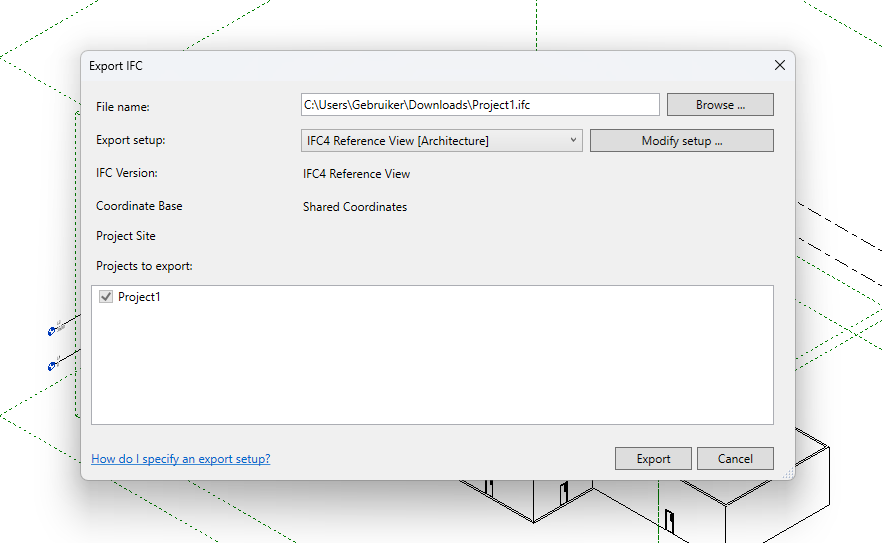 Revit export dialog

Notes
- Avoid unnecessary detail in the model to reduce import time in the Tygron Platform.
How-to's
See also
External links
- https://www.autodesk.com/products/revit/overview - The official Autodesk Revit website