How to remove a traffic unit: Difference between revisions
Jump to navigation
Jump to search
No edit summary |
No edit summary |
||
| Line 1: | Line 1: | ||
It is not possible to remove a [[Unit Type]]. However it is possible to make a | It is not possible to remove a [[Unit Type]]. However it is possible to make a Unit Type inactive and therefore not be visible in the [[3D Visualization]]. | ||
{{Editor steps|title= | {{Editor steps|title=Deactivate a Unit Type | ||
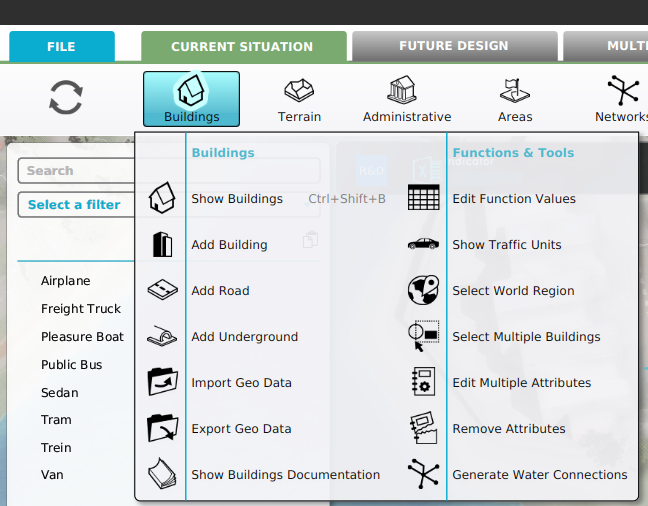
|Select [[Current Situation]]. | |||
|Hover [[Building]]s on the [[ribbon]] bar. | |||
|Select ''Show Traffic Units'' in the popup. | |||
|Select the unit in the unit data overrides | |||
[[left panel]]|Uncheck the Active in Simulation checkbox in the [[right panel]]}} | |||
<gallery heights=200px widths=200px> | <gallery heights=200px widths=200px> | ||
File:Select_unit.png|Select | File:Unit_type_ribbon.png|Select [[Current Situation]], hover [[Building]]s on the [[ribbon]] bar and select ''Show Traffic Units'' | ||
File:Select_unit.png|Select the Unit Type to be deactivated | |||
File:Active_ccheckbox.png|Uncheck the Active in Simulation checkbox | File:Active_ccheckbox.png|Uncheck the Active in Simulation checkbox | ||
</gallery> | </gallery> | ||
[[Category:How-to's]][[Category:Unit Type]] | [[Category:How-to's]][[Category:Unit Type]] | ||
Revision as of 16:02, 8 February 2023
It is not possible to remove a Unit Type. However it is possible to make a Unit Type inactive and therefore not be visible in the 3D Visualization.
-
-
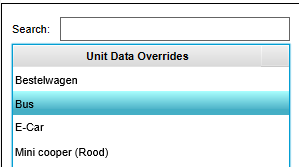 Select the Unit Type to be deactivated
-
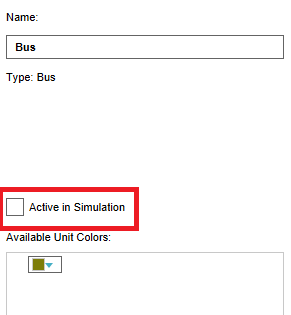 Uncheck the Active in Simulation checkbox


