How to duplicate an Area: Difference between revisions
Jump to navigation
Jump to search
No edit summary |
No edit summary |
||
| (One intermediate revision by the same user not shown) | |||
| Line 1: | Line 1: | ||
{{Editor location|Areas}} | {{Editor location|Areas}} | ||
{{Editor steps|title= | {{Editor steps|title= | ||
| Line 16: | Line 15: | ||
|seealso=*[[Area]] | |seealso=*[[Area]] | ||
|api=*[[Api session event editor area duplicate]] | |api=*[[Api session event editor area duplicate]] | ||
}} | |||
[[Category:How-to's]][[Category:Area]] | [[Category:How-to's]][[Category:Area]] | ||
Latest revision as of 14:45, 29 May 2026
How to duplicate an Area:
- Select "Areas" in the ribbon bar.
- Select the area you wish to duplicate.
- Select "Duplicate" in the left panel.
-
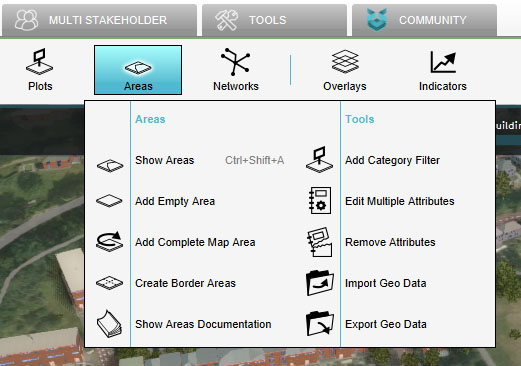 Select "Areas"
 -
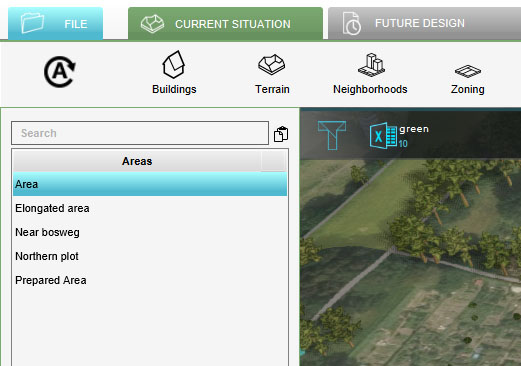 Select Area to duplicate
 -
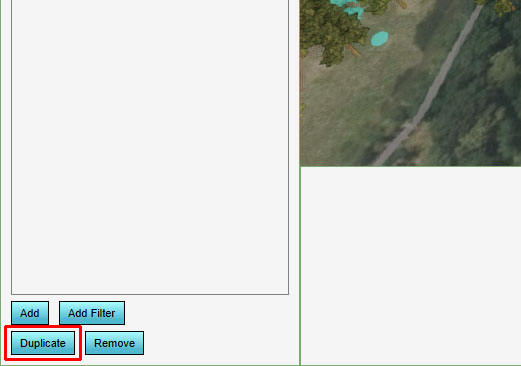 Click on Duplicate


