How to configure a Weather: Difference between revisions
Jump to navigation
Jump to search
No edit summary |
|||
| Line 42: | Line 42: | ||
{{article end | {{article end | ||
|api=*[[Api session items weathers]] | |||
|seealso= | |seealso= | ||
* [[Weather]] | * [[Weather]] | ||
Latest revision as of 09:47, 8 October 2026
Editor → Tools (Ribbon tab) → Weather (Ribbon bar) → Show Weather (Dropdown) → The Weather to edit (Left panel)
How to configure weather in a project:
- Select Tools > Environment > Show Weather
- Select 'Add' from the bottom of the left panel
- Highlight the newly created weather entry on the left panel
- Adjust the properties of the highlighted Weather
-
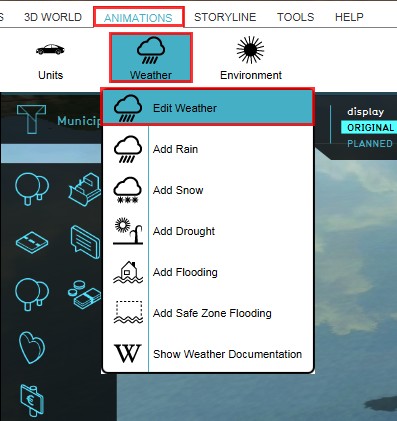 1. Select Tools > Environment > Show Weather
 -
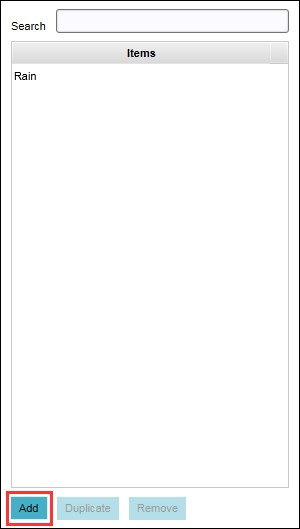 2. Select 'Add' from the bottom of the left panel
 -
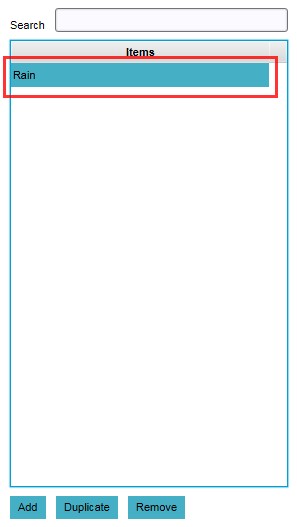 3. Highlight the newly created Weather
 -
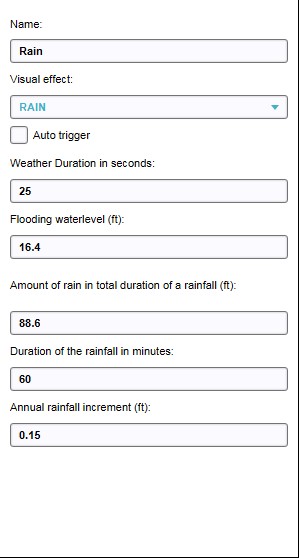 4. Adjust properties of highlighted Weather


Weather properties

Name

Visual effect

Auto trigger

Visual effect period in seconds

Amount of rain in total duration of rainfall

Duration of rainfall in minutes
