How to configure the amount of calculation iterations

From Tygron Support wiki
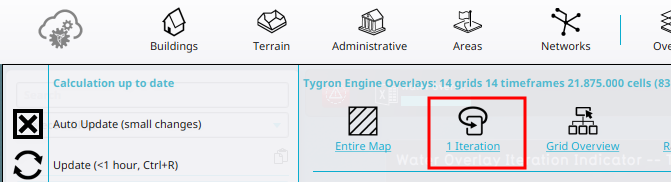
Revision as of 12:05, 21 September 2026 by Frank@tygron.nl (talk | contribs) (Created page with "{{howto|title= |Open a project in the editor |Hover over the Calculation Cloud in the ribbon. |Click on the 1 Iteration link. |In the Dialog window, provide the desired amount of iterations |Confirm with OK. }} <gallery> File:Calculation_cloud_iterations.png|The Iterations link found in the Calculation panel. </gallery> {{article end |seealso= *Simulation Core *Iteration *Iteration Overlay *Select iteration (TQL) *Select iterations (TQ...")
(diff) ← Older revision | Latest revision (diff) | Newer revision → (diff)
Jump to navigation Jump to search
How to configure the amount of calculation iterations:
  1. Open a project in the editor
  2. Hover over the Calculation Cloud in the ribbon.
  3. Click on the 1 Iteration link.
  4. In the Dialog window, provide the desired amount of iterations
  5. Confirm with OK.