How to configure a Weather: Difference between revisions
Jump to navigation
Jump to search
Created page with "{{Editor location|Weather}} {{Editor steps|title=configure weather in a project|Select Animations > Weather > Edit Weather|Select 'Add' from the bottom of the left panel|Highlight the newly created weather entry on the left panel|Adjust the properties of the highlighted weather type}} <gallery> File:EditWeather.jpg|1. Select Animations > Weather > Edit Weather File:AddWeather.jpg|2. Select 'Add' from the bottom of the left panel File:HighlightWeather.jpg|3. Highlight t..." |
No edit summary |
||
| Line 1: | Line 1: | ||
{{Editor location|Weather}} | {{Editor location|Weather}} | ||
{{Editor steps|title=configure weather in a project|Select Animations > Weather > Edit Weather|Select 'Add' from the bottom of the left panel|Highlight the newly created weather entry on the left panel|Adjust the properties of the highlighted weather type}} | {{Editor steps|title=configure [[weather]] in a project|Select Animations > Weather > Edit Weather|Select 'Add' from the bottom of the left panel|Highlight the newly created weather entry on the left panel|Adjust the properties of the highlighted weather type}} | ||
<gallery> | <gallery> | ||
Revision as of 14:10, 21 February 2023
Editor → Tools (Ribbon tab) → Weather (Ribbon bar) → Show Weather (Dropdown) → The Weather to edit (Left panel)
-
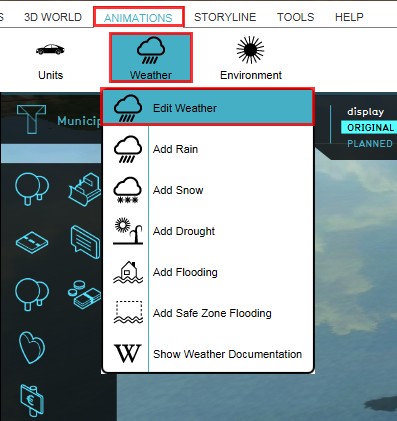 1. Select Animations > Weather > Edit Weather
-
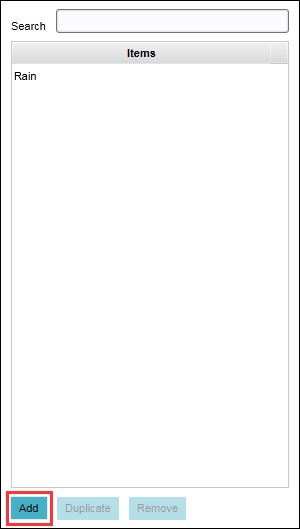 2. Select 'Add' from the bottom of the left panel
-
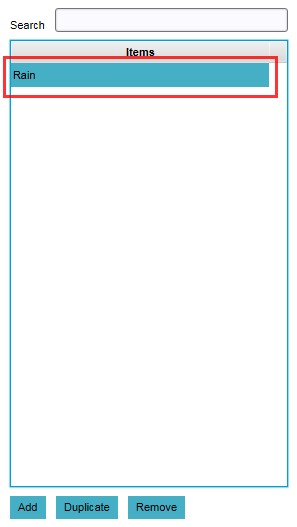 3. Highlight the newly created weather
-
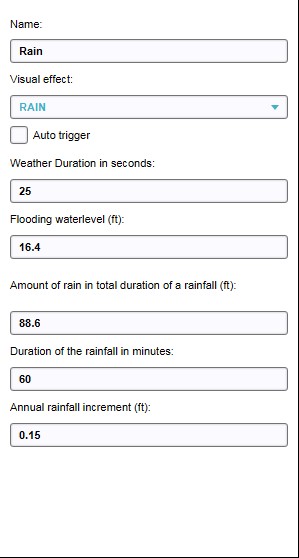 4. Adjust properties of highlighted weather


