How to change individual ownership: Difference between revisions
Jump to navigation
Jump to search
(Created page with "{{Editor location|Buildings}} {{Editor steps|title=change ownership of individual buildings|Select 3D World > Buildings > Edit Buildings|Select the building of which ownership needs to be changed from the list of buildings on the left panel, or by directly selecting the building in the 3D world|Select on the right panel, from the properties of the selected building, the desired owner from the drop down menu of field named "Owner"}}<br> <gallery> File:SelectEditConstructi...") |
(No difference)
|
Revision as of 16:04, 14 October 2022
How to change ownership of individual buildings:
- Select 3D World > Buildings > Edit Buildings
- Select the building of which ownership needs to be changed from the list of buildings on the left panel, or by directly selecting the building in the 3D world
- Select on the right panel, from the properties of the selected building, the desired owner from the drop down menu of field named "Owner"
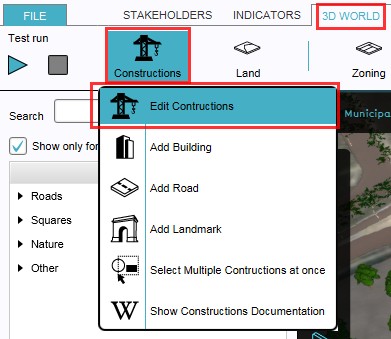
1. Select to edit buildings
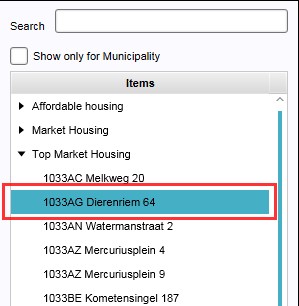
2a. Select from the list the building to be edited
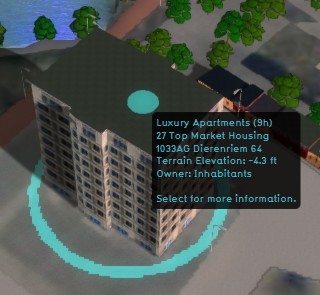
2b. ...or select directly the building to be edited in the 3D world
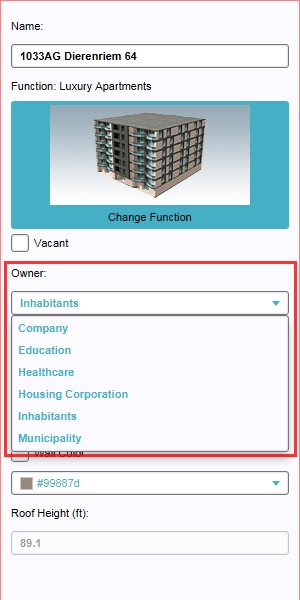
3. Select new owner from drop down menu


