How to set a prequel to a Grid Overlay
Setting a prequel for a Grid Overlay requires that the overlay supports Prequels and uses a different Grid Overlay as input. The supported prequels of a Grid Overlay are stated on the prequel pages of that overlay.
A prequel can be configured using:
- a configuration wizard of a Grid Overlay, if it exists.
- Keys tab of the Overlay in the Editor interface.
- Set prequel event using the API.
This howto describes steps to configure it using the keys tab.
How to set a prequel to a Grid Overlay:
- Open the project in the editor
- Make sure the Prequel Grid Overlays are already present in the project
- Select the Grid Overlay that supports the prequels
- Select the Keys tab in the Right Panel
- Scroll down to the prequel section
- for each supported prequel, if a Grid Overlay is available, select the checkbox to use a prequel and select a Grid Overlay using the Choice box.
- Optionally select a different Timeframe for this prequel.
- Select the General tab
- Click on the Update Now link to recalculate the Overlay
-
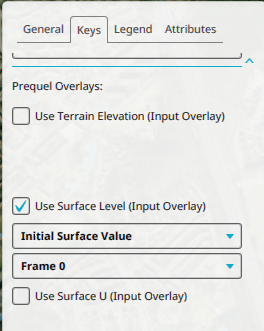 Scrolled down to the prequel sections of the keys tab of an overlay.

Notes
- Automatic prequel setup is also available, such as in the Water Overlay configuration wizard.