How to set a prequel to a Grid Overlay
To set a prequel to a Grid Overlay, it requires two things: The Grid Overlay must support a Prequels and secondly a different Grid Overlay must be used as input. The supported prequels of a Grid Overlay are stated on the prequel pages of such overlay.
A prequel can be configured using:
- a configuration wizard of a Grid Overlay, if it exists.
- Set prequel event using the api.
- Keys tab of the Overlay in the Editor interface.
This howto describes steps to configured it using the keys tab.
How to set a prequel to a Grid Overlay:
- Open the project in the editor
- Make sure the Prequel Grid Overlays are already present in the project
- Select the Grid Overlay that supports the prequels
- Select the Keys tab in the Detail Panel
- Scroll down to the prequel section and for each prequel a Grid Overlay is present, select that Overlay using the Choice boxes.
- Select the General tab
- Click on the Update now link to recalculate the Overlay
-
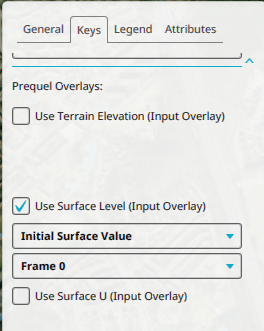 Scrolled down to the prequel sections of the keys tab of an overlay.

Notes
- Automatic prequel setup generation also exist, for example in configuration wizard of the Water Overlay